FREE · NO SIGN-UP · NO WATERMARK
TikTok Banner Splitter
Turn one image into three connected profile tiles — or a full 3×3 grid of 9 tiles, a 2×3, or a Single Cover — with a TikTok banner splitter that shows the crop before you download. Keep the complete photo, fill the frame when you want, and get numbered files in the correct working order.
WHAT IT DOES
What is a TikTok banner splitter?
A TikTok banner splitter takes one continuous design and cuts it into three separate profile tiles. Instead of guessing where the seams land, you see the full row, two cut lines, and the publishing numbers before any file is created. The result can be used for a pinned top row, a repost-style profile banner, a launch announcement, or three coordinated covers.
This page is intentionally narrower than a general image splitter. It focuses on TikTok profile layouts — a Single Cover, a 1×3 top-row banner, a 2×3 mural, or a full 3×3 grid of 9 tiles — adds a TikTok-style profile preview, and explains which piece comes first. It does not design a TikTok Live banner, publish posts, schedule content, or connect to an account.
Use this page when you need:
- 01One image spanning exactly three TikTok profile positions.
- 02A preview that makes split lines and final left-to-right placement obvious.
- 03A safe option that keeps the whole photo instead of silently removing edges.
- 04Three files named and packaged in a practical publishing sequence.
REAL PROFILES
How split banners and 3×3 grids look on TikTok
The same idea in the wild: one image cut into a continuous 1×3 top row, or a full 3×3 grid that reassembles into one big picture across the profile.
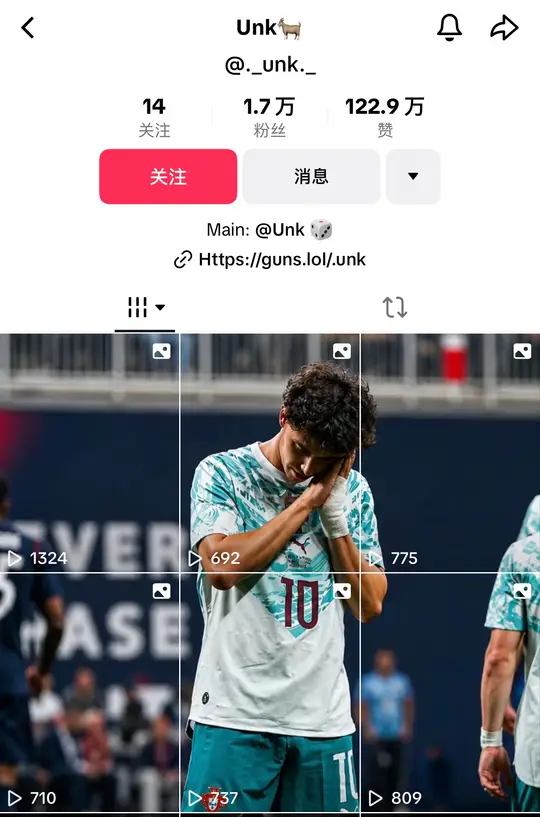
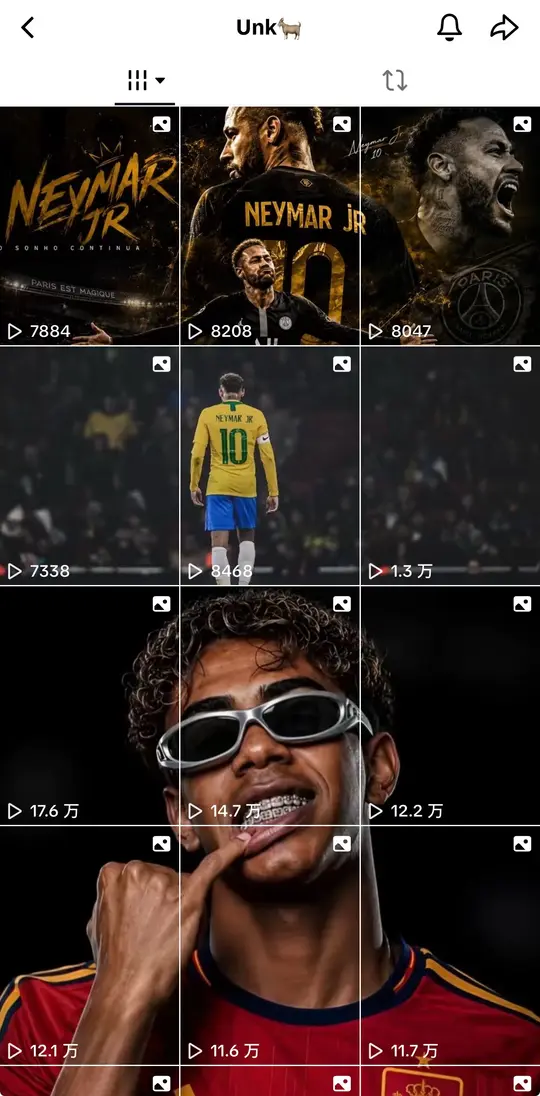
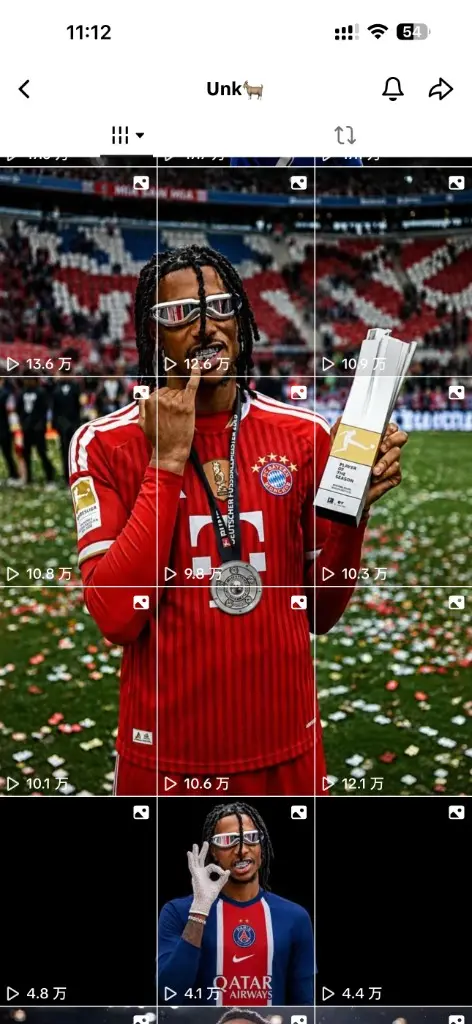
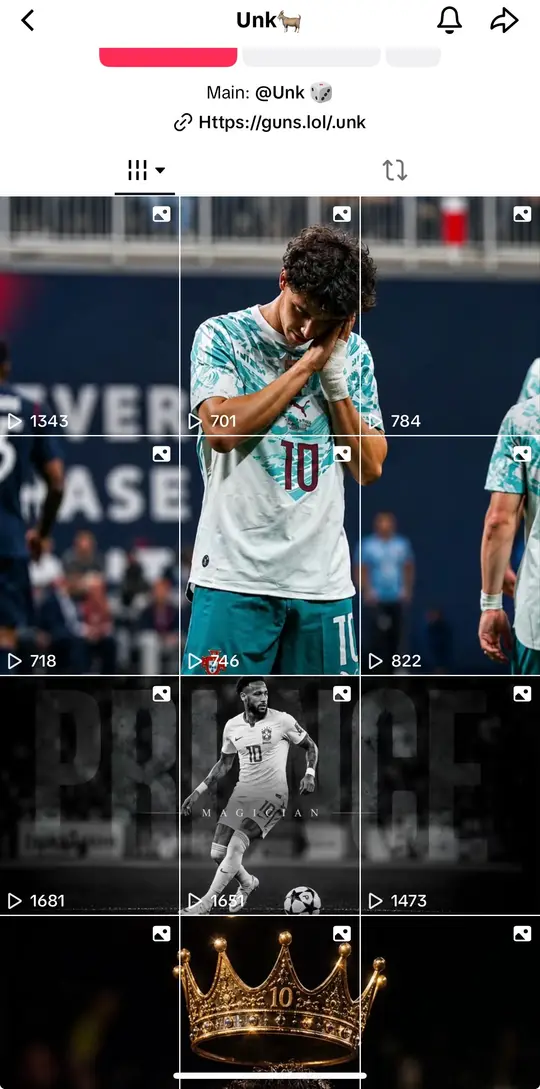
Screenshots of public TikTok creator profiles, shown as layout examples. Split Image is an independent tool and is not affiliated with, sponsored by, or endorsed by TikTok or these creators.
THREE SIMPLE STEPS
How to make a TikTok banner or 3×3 grid
The same three steps work for a 1×3 top-row banner or a full 3×3 profile grid — the tool keeps the task visible from upload to publishing order.

Upload one banner image
Choose a wide image, photo, campaign graphic, or artwork. The file is opened locally in your browser and is not uploaded to our server.
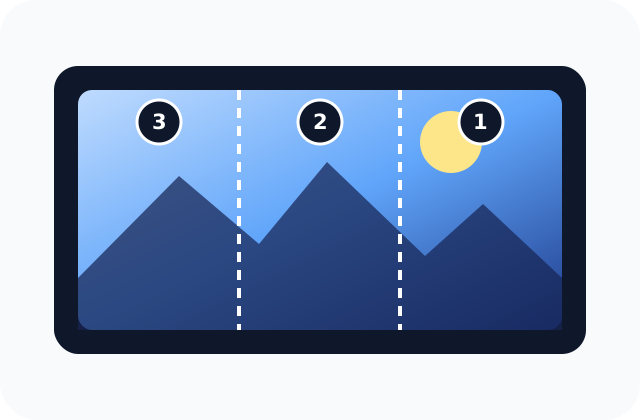
Pick Single Cover, 1×3, 2×3 or 3×3, then frame
Choose Single Cover for one locked 3:4 video cover (1080 × 1440), the 1×3 top-row banner (3 tiles), the 2×3 grid (6 tiles) or the full 3×3 grid (9 tiles). Use Keep all to preserve the whole image or Fill frame for an edge-to-edge result, then check the crop — and the split lines on multi-tile layouts — and move the frame when needed.
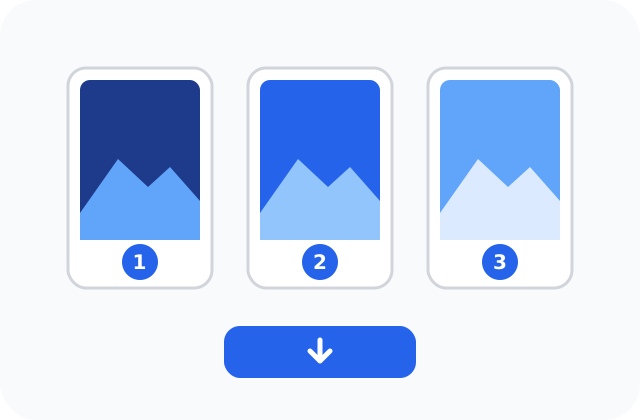
Download and publish in order
Single Cover downloads one image (tiktok-cover). For 3, 6 or 9 tiles, download them individually or as a ZIP, then post them in the numbered order — bottom-right or right side first, top-left or left side last.
KEY FEATURES
TikTok banner splitter features
Cover, banner or full grid
Switch between Single Cover, a 1×3 top-row banner, a 2×3 mural, and a full 3×3 grid — the tool relabels every export for you.
Keep-all mode
The default preserves the complete image and pads the frame when ratios do not match.
Profile-shaped preview
View three portrait tiles together instead of trusting three disconnected downloads.
Order inside the download
File names and the included note repeat which tile should be used first, second, and last.
WHY THIS WORKFLOW
Spend less time fixing a broken profile row
See the full composition first
The connected preview exposes awkward seams before you publish three separate posts.
Protect important content
Keep all starts with the safer choice, while Fill frame makes intentional cropping visible and adjustable.
Avoid posting-order mistakes
Numbered filenames, result cards, and the ZIP note all repeat the same right-to-left publishing sequence.
Work without an account handoff
Your source stays in the browser, and the tool prepares portable files instead of asking for TikTok access.
SIZE AND CROP
TikTok profile grid size for a banner or 3×3 grid
Single Cover exports one 1080 × 1440 file — the 3:4 window TikTok keeps in the profile grid. The recommended 1×3 preset uses a complete 3240 × 1440 canvas and exports three 1080 × 1440 files. 2×3 uses 3240 × 2880 (six tiles). The 3×3 grid keeps that same 3:4 tile and stacks it three rows deep, so it splits a 3240 × 4320 canvas into nine 1080 × 1440 files. These are practical design presets rather than a promise that every TikTok surface will always display the same crop; app versions and content types can render thumbnails differently.
| Preset | Full canvas | Each tile |
|---|---|---|
| Single Cover · 3:4 | 1080 × 1440 | 1080 × 1440 (×1) |
| 1×3 · 3:4 profile | 3240 × 1440 | 1080 × 1440 (×3) |
| 1×3 · 1:1 square | 3240 × 1080 | 1080 × 1080 (×3) |
| 2×3 · two rows | 3240 × 2880 | 1080 × 1440 (×6) |
| 3×3 · full grid | 3240 × 4320 | 1080 × 1440 (×9) |
FIT OR FILL
How to stop important details from disappearing
Start with Keep all. It scales the complete image into the TikTok banner frame, so a door, face, logo, or caption near an edge remains visible. Empty space is filled with a neutral background. This is the safer choice when preserving every detail matters more than filling every pixel.
Choose Fill frame when you want an edge-to-edge TikTok profile banner. The TikTok banner splitter then crops only what is necessary to match the selected shape. Use the horizontal and vertical controls to move the subject away from a seam, and inspect the preview before generating files.
USE CASES
Ways to use a three-post TikTok banner
Launch or campaign row
Use one clean product image across three pinned covers. Keep the product near the center tile and place supporting color or texture at the outer edges so every crop still works alone.
Creator profile header
Turn a portrait, logo system, or channel artwork into a recognizable top row. The preview helps keep a face away from split lines and checks whether each tile remains understandable by itself.
Story or reveal sequence
Build a visual left-to-right reveal while publishing in the numbered order. The three tiles can support separate videos or photo posts while still forming one connected profile image.
PRACTICAL TIPS
Make the TikTok banner work after it leaves the tool
The splitter handles the picture row. For the name, bio, and video captions next to it, copy a style from a TikTok font generator.
Keep text away from seams
Do not place a word directly across a cut unless the effect is intentional. Small profile gaps and changing crops can make letters difficult to read.
Let each tile stand alone
A visitor may encounter one post before opening your profile. Give every piece enough subject matter, contrast, or context to work independently.
Test drafts before public posting
The TikTok banner splitter controls the files, not the platform. Check thumbnail cropping and profile order in your current app before publishing the full set.
Save the ZIP until the row is live
The ZIP preserves filenames and instructions together. If you pause between posts, the sequence note prevents accidental left-to-right uploading.
FAQ
TikTok Banner Splitter Questions
Straight answers about image size, cropping, privacy, downloads, and publishing.
What is a TikTok banner splitter?
A TikTok banner splitter turns one wide image into three connected profile tiles. This tool previews the complete row, exports three separate files, and numbers them in publishing order so the image reads correctly from left to right on your profile.
How do I make a TikTok profile banner from one image?
Upload one image, choose the 3:4 profile preset, select Keep all or Fill frame, and generate the three tiles. Download the files, publish the right tile first, the center tile second, and the left tile last, then use the pin or profile controls available in your TikTok app.
Can it split one image into a TikTok banner in 3 parts?
Yes. This is a dedicated TikTok banner splitter in 3: it splits one image into 3 parts sized for the profile row. Upload a wide picture, check the two cut lines, then export three tiles — so you can split an image for a TikTok banner without any separate editor.
Can it also make a 3×3 TikTok grid (9 tiles)?
Yes. Switch the Layout to 3×3 and the tool splits one image into a full 3×3 grid of 9 profile tiles. Every tile is locked to the 3:4 profile shape so the nine posts line up into one large picture across your profile. Because new posts appear first, publish in the numbered order — the bottom-right tile first and the top-left tile last — and the included ZIP note repeats that sequence.
Can it make a 2×3 TikTok grid (6 tiles)?
Yes. Switch Layout to 2×3 and the tool frames the photo at 9:8, then cuts six 1080 × 1440 (3:4) tiles — two rows of three, the first six spots on a TikTok profile. Publish bottom-right first and top-left last, same reverse order as the 3×3 grid. The TikTok preview shows those six covers in the video grid under the avatar.
Can it crop a single TikTok video cover?
Yes. Switch Layout to Single Cover. The crop locks to 3:4 (1080 × 1440) — the shape TikTok keeps in the profile grid after it trims a 9:16 video — and exports one image named tiktok-cover, with no ZIP and no extra slices. Use that file as the video cover so faces and text stay inside the profile cell instead of getting chopped at the top and bottom. Video cover export can also wrap the same crop to 1080 × 1920 if you need a 9:16 file.
Should I choose Single Cover, 1×3, 2×3 or 3×3?
Use Single Cover when you only need one 3:4 video cover for the first grid cell under the avatar. Use 1×3 when you want a continuous banner across your top row of three tiles. Use 2×3 for a six-tile mural on the first two rows. Use 3×3 when you want a bigger mural that fills nine tiles, such as a portrait or poster that spans the whole visible grid. You can switch layouts at any time; the preview and downloads update automatically.
Is this a TikTok banner cutter, divider, or splicer?
Yes — cutter, divider, splicer, and image splitter all describe the same job. This TikTok banner image splitter cuts one design along two vertical lines into three connected pieces, so whichever term you searched for, the result is the same three profile tiles.
Is this TikTok banner maker free and online?
Yes. The TikTok banner maker is free to use in a modern browser, requires no account, and adds no watermark. You can generate and download as many three-tile banners as your device can process.
Can I use it as a TikTok banner maker to design the background?
It works as a lightweight TikTok banner maker and creator: it frames your image and fills empty space with a blur, white, or black background before exporting the tiles. For full TikTok banner design — adding text, logos, or custom artwork — build the artwork first in a design tool, then split it here.
Does this also make a TikTok LIVE banner?
This page focuses on the three-tile profile banner that spans your top row. A TikTok LIVE banner is a single separate cover, so you would design that on its own; you can still reuse one exported tile for a matching look, but the 3-part split is meant for the profile grid.
What size should a three-tile TikTok banner be?
Single Cover exports one 1080 × 1440 (3:4) image. The recommended 1×3 working preset is 3240 × 1440 pixels for the complete banner, which creates three 1080 × 1440 profile tiles. A larger source is also fine. The square preset creates a 3240 × 1080 banner with three 1080 × 1080 files. For 2×3, aim for 3240 × 2880 (six 1080 × 1440 tiles). For 3×3, aim for 3240 × 4320 so each of the nine tiles exports at 1080 × 1440.
Why does the TikTok banner splitter number the right tile as #1?
The right tile is numbered #1 because new profile posts commonly appear before older posts. Publishing right, center, then left allows the final top row to read naturally from left to right. Always verify drafts because TikTok can change profile ordering and pin behavior.
Can I keep the whole image without cropping out a person or text?
Yes. Keep all is the default and scales the entire image inside the banner frame, adding neutral space when the aspect ratios do not match. Use Fill frame only when you prefer an edge-to-edge result and accept that some outer content may be cropped.
Are my images uploaded or stored?
No. Image decoding, framing, splitting, and ZIP creation happen locally in your browser. The tool does not send the image file to our server, and reloading or closing the page clears the active editing session.
Does the TikTok banner splitter work on a phone?
Yes. Open the page in a current mobile browser, choose an image from Files or your downloaded photos, generate the tiles, and save them individually or as a ZIP. Very large images may work better after compression on phones with limited memory.
Can this tool publish or pin the banner to TikTok for me?
No. This tool only prepares image files and never connects to your TikTok account. You publish the files yourself and decide whether to use them as photo posts, video covers, repost artwork, or pinned profile tiles.
What is the difference between a TikTok banner splitter and a grid planner?
A TikTok banner splitter cuts one connected design into separate files. A grid planner arranges several existing covers to preview an entire profile. Use this page when the final result should be one continuous image spanning three tiles.
Should I download JPG, PNG, or WebP tiles?
Choose JPG for photographs, PNG for logos or graphics with sharp text, and WebP when smaller downloads matter. The visible composition and three-tile posting order stay the same in every format.
Is this tool affiliated with TikTok?
No. Image Splitter is an independent browser tool and is not affiliated with, sponsored by, or endorsed by TikTok. Platform layouts can change, so preview the result in your current app before making the posts public.
Create Your Three-Tile TikTok Banner
Use the TikTok banner splitter above to preview the full image, generate three numbered tiles, and download the complete set without an account.
Open the TikTok Banner Splitter ↑